Friday, 17 May 2013

Chat with Friends through Command Prompt (CMD)

Chat with Friends through Command Prompt (CMD)

Hello friends Now you can Chat with other users / friends through Command Prompt . 

This is a Trick.

1) All you need is your friend's IP Address and your Command Prompt.

2) Open Notepad and write this code as it is.....!

@echo off
:A
Cls
echo MESSENGER
set /p n=User:
set /p m=Message:
net send %n% %m%
Pause
Goto A


3) Now save this as "Messenger.Bat".

4) Open Command Prompt.

5) Drag this file (.bat file) over to Command Prompt and press Enter.

6) You would then see something like this:


 7) Now, type the IP Address / Computer name of the computer you want to contact and press enter

You will see something like this:


8) Now all you need to do is type your message and press Enter.
Start Chatting.......!


Enjoy!!!

To show your name in taskbar

To show your name in taskbar


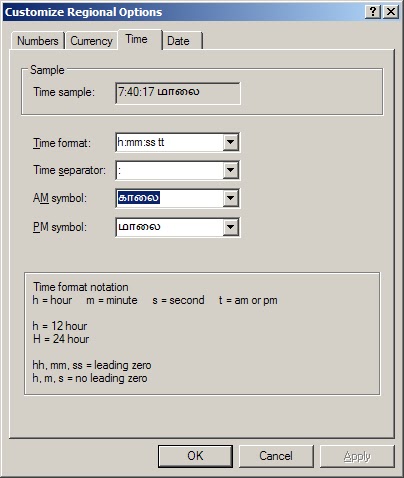
Trick to Show Your name after time in task bar...
Try this trick to add up ur name in place of AM and PM beside time Its simple

Step-1: Navigate to → Start
Control PanelRegional and Language OptionClick on CustomizeGo to TIME TabChange AM symbol and PM symbol from AM and PM to your nameApplyOK ...
Did It change? If not, follow step-2 below.

Step2: Now go to time in taskbar and Double Click it to open "Date and time property" ...Look place where time changes in digital form i.e. 02:47:52 AM , click to arrow to change the AM or PM by selecting and press arrow. It will Show ur name or name that was entered by you, Apply
OK 


Fix corrupted files in Windows XP

Fix corrupted files in Windows XP

1.Insert Windows XP cd into CD/DVD drive

2. go to Run

3. type "sfc /scannow" (Without quotes)


4. Then press Enter.


5. It will copy new files from Disk.


(Note: Before run this command insert OS disk into CD/DVD drive or Map (Mount) OS's ISO file as a drive)


Increase the speed of your file sharing

Increase the speed of your File sharing

Simple Way to Share Multiple Folders :
 

  1. Go to Run and Type SHRPUBW.EXE then press Enter
  2. Select the folder you want to share and Set permissions 

Your share folder is ready now to access as fast..... 

To create a Folder without any name

To create a Folder without any name


  1. Create a new Folder or Rename a Folder.
  2. Press alt & type 0160 or 255
  3. Then press Enter.
Now you can get a Folder without any name.

Thursday, 16 May 2013

Reset your Windows Administrator Password while emergency

Reset your Windows Password while emergency

To reset Windows users / administrator password is very very very simple.

Need an external boot CD (Hiren's boot CD ). You download and burn it as Bootable disk.

       Boot your computer by using above mentioned any Boot CD. Select Mini Windows XP and press enter. Now your system will boot through Mini Windows XP Operating System.

  1. Go to C:\WINDOWS\system32 and find the file "sethc.exe". Rename it as "Old sethc.exe".
  2. Then find file "cmd.exe" and rename it as "sethc.exe". 
  3. Now remove the Boot CD from CD/DVD drive and restart your computer. 
  4. On logon page (you don't try to login) press the SHIFT key 5 times. You can get Command prompt window.
  5. In this window type "net user Administrator *"

  6. Press enter (Don't  type any password).
  7. Again press enter (Don't  type any password).
  8. Now your Administrator Password has been reseted successfully.
Enjoy !!!


To make fast Boot your Computer

To make fast Boot your Computer

       Most of the Computers had enabled all Services and all (installed) Applications while system booting (Start up) by default. Since your computer will take time to stable after Login. Also computer will slow No need all Services and Applications while starting. So see the below steps; and decide that which Applications / Services are you want on system start up.

Go to Run → Type msconfig →

Go to Startup TAB, then remove Tick mark unwanted.

Then Go to Services TAB, Tick option "Hide all Microsoft Services". Now you can remove all unwanted applications from the list.

 Then press Apply and OK buttons and Restart your computer.

After restart your computer you can feel the Speed 100% sure while Login and Working.

After these steps if you could not get Good performance, may be the problem is in your computer's HDD. 

To conform whether HDD is problem or not,  Watch the HDD LED in front of cabinet (CPU Box). When computer is in Ideal, HDD's LED should not Glow / Blink continuously. This is normal. Otherwise If glowing continuously defensively your HDD is problem. Chang that Hard disk.